
AI feedback tools for teachers are most useful when they draft comments that you can check against the student’s actual writing, edit, and deliberately release. Start with a school-approved tool, a clear assignment criterion, and a fictional sample. Choose Brisk if you want to review comments alongside a document; consider MagicSchool if you prefer a criteria-led feedback workspace or need to evaluate its class feedback workflow.
The deciding question is practical: can you keep an inaccurate comment away from a student, correct it without losing the evidence, and share only the version you approve? This guide compares the documented controls, explains seven review checks, and provides a worked example you can reuse before introducing an AI feedback workflow.
Scope: This is a documentation-based comparison, checked October 10, 2026. ChalkBench has not benchmarked these tools or measured their accuracy. The example comments below were written for this guide and are not product outputs.
In this guide
Compare AI feedback tools for teachers by review controls
When comparing AI feedback tools for teachers, a long feature list tells you little about the quality of a comment. Compare where the draft appears, what the teacher can change, and what action makes it visible. The shortlist below covers two different working approaches. Neither earns an accuracy ranking here.
| Decision | Brisk Teaching | MagicSchool |
|---|---|---|
| Documented feedback approach | Targeted inline drafts, Glow & Grow, rubric-based feedback, and next steps. | Writing Feedback uses supplied criteria; Class Writing Feedback supports rubric-based batches. |
| Review and release | Targeted Google Docs comments stay unseen by students until the teacher reviews and clicks Comment. | Its Writing Feedback documentation describes teacher review and editing before sharing. |
| Important distinction | Other feedback styles insert text or require copying it; check who can see the destination. | Individual Writing Feedback and Class Writing Feedback are different workflows with different access considerations. |
| Check before choosing | Feedback style, document type, plan access, and whether the destination is shared. | Editing, delivery method, assignment quota, and school integration approval. |
Sources: Brisk’s Give Feedback instructions, MagicSchool’s Writing Feedback documentation, and MagicSchool’s plan comparison. The recommendations below are editorial judgments about workflow fit, based on those documented differences.
Brisk: review comments close to the writing
Brisk’s instructions start with opening a document or PDF, activating Brisk, and choosing Give Feedback. Targeted Feedback produces inline comment drafts in Google Docs. Its Microsoft Docs equivalent is listed as Premium and beta. Glow & Grow and other summary styles can insert text at the top of a Google Doc or provide text to copy elsewhere.
For a teacher who wants to inspect the sentence next to each comment, targeted feedback is the approach to evaluate first. Keep summary feedback in a private working area until it is checked. Inserting text into an already shared document is a different release route from approving an inline draft.
Plan caveat: Brisk’s help page lists targeted Google Docs feedback for all users, while its general FAQ describes targeted feedback among Premium capabilities. Confirm the specific feature in your account or with support before relying on free access. The current plans page lists free teacher access and institution-priced plans; it does not resolve every feature-level difference.
MagicSchool: separate individual feedback from class batches
MagicSchool’s Writing Feedback page describes supplying student writing and criteria, then reviewing and editing the resulting suggestions before students receive them. It is a candidate when you want to work from a defined criterion and prepare a concise response rather than begin with inline annotations.
Class Writing Feedback is a separate batch workflow. The pricing page lists standard access across plans, with review, personalization, and sending based on a rubric. Do not assume a Plus subscription gives unlimited use of this class feature because Plus advertises unlimited generations for other tools.
The Learning Outcomes access notice says Enterprise districts without the add-on receive three Class Writing Feedback assignments per teacher per year, resetting July 1. That notice addresses Enterprise partners; verify your own plan’s quota separately. It also explains how the district add-on restores unlimited access. This distinction matters if you intend to use class feedback every week.
Before connecting a live class, evaluate AI feedback tools for teachers with fictional writing. Check how you select a submission, edit a comment, preview the destination, and stop a send operation. Those are evaluation tasks, not a claim that ChalkBench has completed them in a signed-in product account.
7 review checks before sharing draft comments
Use these checks when comparing AI feedback tools for teachers and when reviewing individual outputs. A tool can satisfy one check and still fail another. A clearly labeled approval button, for example, does not prove that the suggested feedback is accurate.
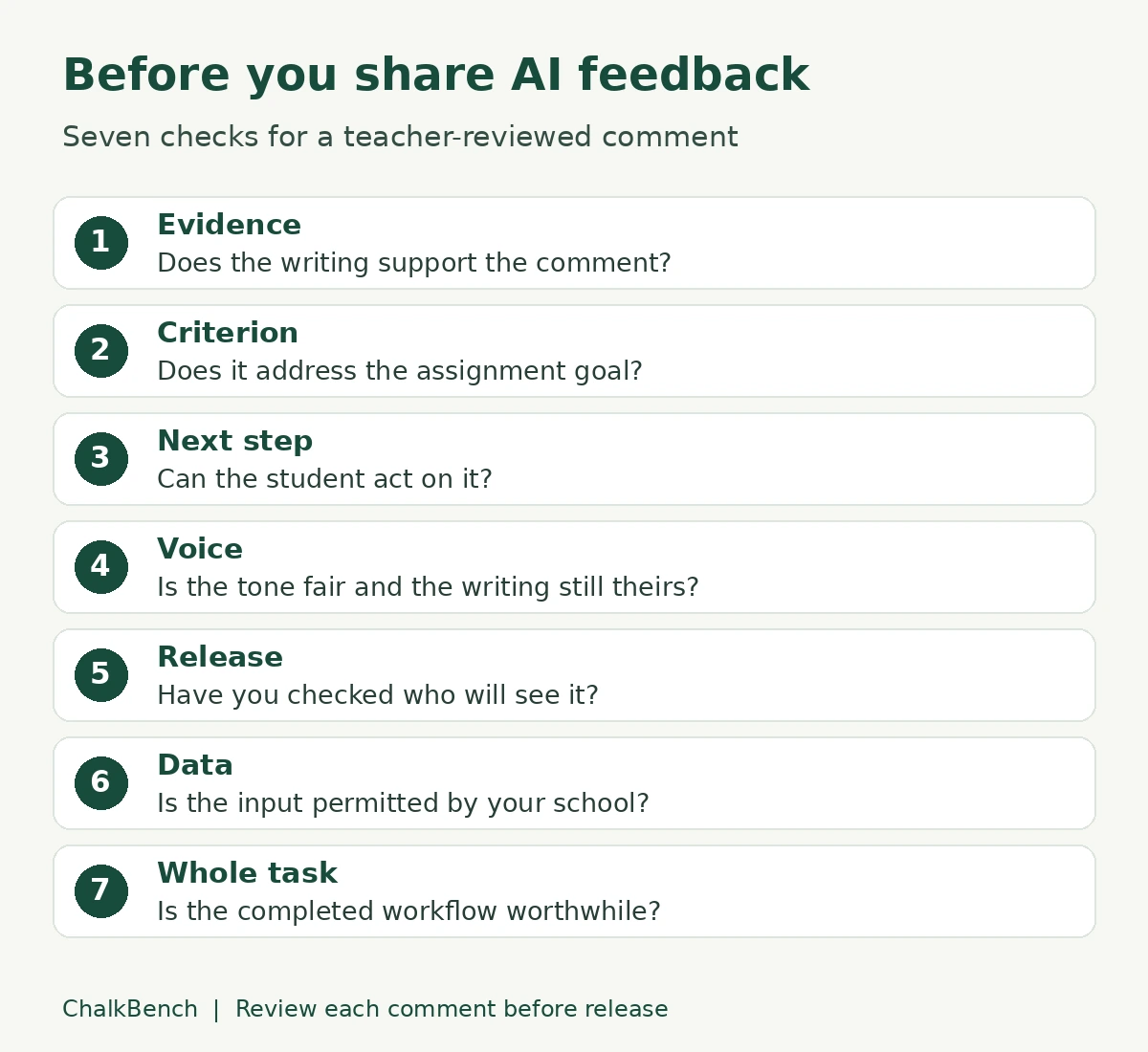
1. Tie every comment to evidence in the writing
Read the student’s work before accepting the draft. For each comment, identify the sentence or passage it describes. If the feedback praises a counterargument that is absent, remove it. If it says there is no evidence when the paragraph includes an example, decide whether the real issue is insufficient evidence or missing explanation.
Keep the distinction between observation and inference visible. “You mention a library” describes the text. “You researched library access thoroughly” makes a claim the text may not support. A fluent draft can blur that distinction, so ask for short evidence references and verify them yourself.
When reviewing a longer essay, check that the tool had access to the complete relevant section. A clipped extract or poor text extraction can produce confident comments about missing content. Compare the input with the original before treating an apparent omission as a student’s mistake.
2. Match the assignment criterion
Define the learning goal before generating comments. If today’s task is explaining how evidence supports a claim, feedback dominated by spelling corrections does not address the main objective. Give the tool the assignment and the specific rubric descriptor, not just “mark this essay.”
When using AI feedback tools for teachers, use the same criterion for every draft in the assignment, while allowing comments to respond to different evidence. Consistency does not mean identical wording. It means students receive guidance on the skill they were asked to demonstrate.
If your rubric is vague, improve it first. ChalkBench’s guide to AI rubric generators for teachers explains how to review generated criteria before using them. A feedback tool cannot repair an unclear assessment goal merely by producing more detailed prose.
3. Make the next step achievable
A useful draft from AI feedback tools for teachers tells the student what to do next without writing the answer for them. “Improve your analysis” is difficult to act on. “After your library example, add one sentence explaining how it supports your claim about access” identifies a specific revision.
Choose a manageable priority. A short paragraph may need one main next step rather than six corrections. Decide which change would move the writing toward the learning goal, then remove suggestions that compete with it.
Watch for advice that requires material the student was never given. A comment asking for statistics is inappropriate if the task provided only a short source passage and did not ask for independent research. Feedback should fit the available resources and the revision time.
4. Review tone, language, and student voice
When reviewing AI feedback tools for teachers, rewrite comments that label the learner rather than the work. Describe the missing explanation instead of calling a student careless. Praise should also name a demonstrable strength, rather than offer empty reassurance.
Do not mistake a dialect, an emerging writer’s language pattern, or a deliberate stylistic choice for evidence of weak understanding. Check what the assignment actually assesses. If language conventions are part of the goal, address them explicitly and proportionately.
Preserve the writer’s choices where possible. A draft comment that supplies a polished replacement paragraph can turn revision into copying. Prefer a question, a narrow instruction, or a reference to a taught strategy. The student should still decide how to express the idea.
5. Keep a deliberate release step
In AI feedback tools for teachers, identify the exact action that shares the feedback. A draft window, a private document, an inline comment, and a class send action are different states. Use a fictional sample to establish which state you are in before handling real work.
Check every destination for existing access. A document can already be visible to students even when you consider it a working copy. Drafting privately and transferring an approved comment later may be preferable if the workflow does not clearly separate generation from release.
For a batch, verify the student-to-document mapping and each approved response. Reviewing a few samples cannot confirm that every student receives the correct comments. If the interface makes that hard to inspect, reduce the batch or use an individual workflow.
6. Check what data enters and remains in the service
School approval should cover the particular workflow, including document access and any connected accounts. Removing a name alone does not necessarily remove identifying information: a personal narrative can still reveal a student, family, or sensitive situation.
Brisk’s privacy FAQ distinguishes underlying student work from stored prompts and generated outputs. It says the underlying essay is not stored, while inputs and outputs are; a name included in either can therefore remain. Do not put identifiers into a prompt simply because the original document has been anonymized.
MagicSchool’s privacy policy describes processing connected Classroom submission data and retaining personal information for stated purposes. It also prohibits using processed data to train AI models. “Not used for training” does not mean “nothing is stored.” Ask your school’s administrator about permitted data, retention, deletion, and connected-account permissions.
Start an evaluation with an invented paragraph. Use only the data your school permits once the workflow is approved. This article does not determine whether a product meets your school’s legal or contractual requirements.
7. Measure the whole review task
To evaluate AI feedback tools for teachers, time the complete process: preparing the input, generating the draft, checking the evidence, rewriting, delivering the comment, and fixing any delivery errors. Generation speed alone is a weak reason to adopt a tool.
For a small approved pilot, keep a simple record of inaccurate observations, off-target suggestions, substantial rewrites, and delivery problems. Describe what each issue was rather than assigning a vague star rating. Include different types of writing so an easy sample does not decide the result.
Compare that record with your normal feedback method. A reusable teacher-written comment bank may work better for predictable issues; a brief conference may work better when you need to ask what the student meant. Expand use only if the completed workflow improves your practical task.
Worked example: reject a fluent but unsupported comment
This fictional sample and both comments were authored for ChalkBench. They illustrate a review decision, not a test result from Brisk, MagicSchool, or another product.
Assignment: Write a short argument about whether a school should provide a quiet study space. Explain how one example supports your claim.
Our school should offer a quiet room after lunch. The library is sometimes busy, so students cannot always find a calm place. A separate room would help students finish work. Some students prefer working with friends.
The paragraph has a claim, an example about the library, and a possible alternative preference. It does not yet explain the link between a calm space and completing work. It mentions a different preference without developing a response to it.
| Comment | Teacher review |
|---|---|
| “Your research proves that quiet rooms improve grades, and your counterargument is fully developed.” | Reject. The paragraph includes no research, grade evidence, or developed response to an opposing view. |
| “Your library example shows why another space might be useful. Add a sentence explaining how a quieter room could help students complete their work.” | Keep or adapt. It identifies an existing example and asks for a revision aligned with the stated criterion. |
Do not repair the rejected comment by softening its tone alone. The evidence problem would remain. Replace it with an observation the writing supports, then select a next step that belongs to the assignment.
If responding to an opposing view were also a required criterion, you could add a separate question about students who prefer collaboration. In this task, explaining the example is the priority. That decision belongs to the teacher’s interpretation of the assignment, rather than to the length or confidence of a generated response.
A formative writing prompt for AI feedback tools for teachers
Use this prompt only in approved AI feedback tools for teachers with permitted input. Replace the bracketed fields with the task details. It is intended to constrain the draft, not guarantee correctness.
Draft formative feedback for [writing task]. The learning goal is [specific skill]. Use only this criterion: [rubric descriptor]. Read the supplied writing as evidence. Identify one supported strength and one priority for revision. Refer to the relevant sentence or passage without inventing quotations. Give one achievable next step. Keep the feedback under [appropriate length]. Do not assign a grade, infer personal characteristics, invent research, or rewrite the response. If the writing does not provide enough evidence, say what cannot be determined. Return a teacher-review draft only.
After generation, check the evidence reference, the criterion, and the next step. Shorten or rewrite the response in your own professional voice. If the tool cannot follow the requested format, simplify the task rather than repeatedly prompting it with more personal information.
For a longer assignment, separate the feedback goals across stages. You might address the argument first and conventions in a later revision. Avoid asking for a full diagnostic assessment when a single targeted comment would help the student move forward.
AI feedback tools for teachers: a controlled workflow
- Prepare: Choose one assignment goal and a school-approved tool. Check feature access using fictional writing.
- Draft privately: Supply only permitted content and the relevant criterion. Keep the response in a working area you control.
- Review: Read each comment beside the writing. Reject unsupported claims and rewrite the priority action.
- Deliver deliberately: Confirm the student, document, and final wording before sharing through the approved route.
- Follow up: Give time for revision and examine the student’s changes. A sent comment is not evidence that the feedback was understood.
Record enough context to explain your decision: the criterion used, the approved comment, and the revision you requested. Follow your school’s recordkeeping rules. Avoid keeping unnecessary copies of student writing across additional services.
If you want to keep the process teacher-operated, see teacher-only AI workflows without student accounts. An account-free student experience still requires checking the data and permissions used by the teacher.
Frequently asked questions about AI feedback tools for teachers
Can AI feedback tools for teachers assign final grades?
Some products offer scores, but this guide evaluates draft formative comments. A generated score is not validation of a student’s achievement. Use the school’s assessment process and your professional judgment; do not transfer a score into an official record simply because the feedback sounds convincing.
Does a free plan include all feedback controls?
No. Check the particular tool, editing feature, quota, and delivery route. Brisk’s official pages differ on targeted-feedback access, and MagicSchool distinguishes standard class feedback access from the Learning Outcomes add-on. Evaluate the account you will actually use, including what happens after a trial ends.
Can I use scanned or handwritten work?
Only if your chosen workflow supports the input and you verify the extracted text. A misread word or missing line can change the feedback. If you cannot confidently compare the extracted version with the original, provide feedback directly or use a school-approved transcription process first.
Do students need their own AI accounts?
A teacher can prepare an approved comment and return it through the school’s existing system. That does not require a student-facing AI conversation. Connected class workflows may have additional account and permission requirements; check those separately rather than assuming every feature follows the same route.
What should I do when the feedback is generic?
Check whether the input includes the assignment criterion and enough writing evidence. Request one supported observation and one next step. If the draft remains vague, use your own comment. Repeated generation is useful only if it produces something worth reviewing.
Choose the workflow you can inspect
Begin with Brisk’s document-based approach if reviewing alongside the writing is your main requirement. Consider MagicSchool’s criteria-led workspace and investigate its separate class workflow if you need batches. Verify feature access, permissions, and the release route with fictional material before committing to either.
The strongest AI feedback tools for teachers are the ones that fit a review process you can sustain. Keep the teacher in charge of the evidence, the revision priority, and the final message. If reviewing the generated draft takes longer than writing a useful comment yourself, use the simpler method.